‏הצגת רשומות עם תוויות Railes. הצג את כל הרשומות

יום שישי, 12 ביולי 2013

Continue the Searching in Rails

Update the view
Add search form and handle the submit using jquery

  1: <%=form_for :searchP ,:html => { :id => "Start_Search_Form" } do |f| %>
  2:   <fieldset>
  3:     <legend>Search for operator</legend>
  4:     <%= f.label :pharse %>
  5:     <%= f.text_field :pharse,:size=>"45",:class=>"round",:id=>"pharse" %><br/>      
  6:  <p><%= button_to "Start Search",{:class=>"SearchButton"} %></p> 
  7:  </fieldset>
  8:  
  9: <%end%>
 10: 
 11: <script src="../../Scripts/jquery-1.8.2.js"></script>
 12: <script>
 13: 
 14: $('#Start_Search_Form').submit(function() {  
 15:     var valuesToSubmit = $(this).serialize();
 16: 
 17:   alert (valuesToSubmit);
 18:   
 19:     $.ajax({
 20:         url: $(this).attr('StartSearch'), //sumbits it to the given url of the form
 21:         data: valuesToSubmit,
 22:         dataType: "JSON" // you want a difference between normal and ajax-calls, and json is standard
 23:     }).success(function(json){
 24:        alert (json);
 25:     });
 26:     return false; // prevents normal behaviour
 27: });
 28: 
 29: </script>

note the changing of the rails form id


and the result:
Capture49 


Resources


http://stackoverflow.com/questions/6723334/submit-form-in-rails-3-in-an-ajax-way-with-jquery
http://stackoverflow.com/questions/8682076/change-html-form-id-generated-by-form-for-rails-3-1

יום חמישי, 27 ביוני 2013

Start handle the searching in ROR

The modal

  1: class SearchFor < ActiveRecord::Base
  2:   attr_accessible :pharse
  3: end
  4: 

The controller

  1: class OperatorsController < ApplicationController
  2:   # GET /operators
  3:   # GET /operators.json
  4:   def index
  5:     @operators = Operator.all
  6:     @searchP  = SearchFor.new 
  7:   @searchP.pharse = "zvika"
  8:   
  9:     respond_to do |format|
 10:       format.html # index.html.erb
 11:       format.json { render json: @operators }
 12:     
 13:   end
 14:   end

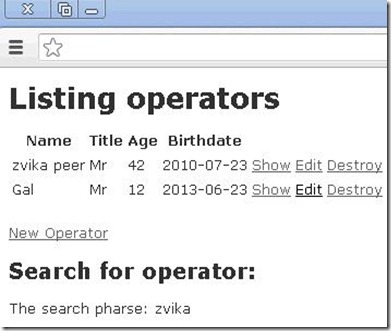
The view

  1: <h2>Search for operator:</h2>
  2: 
  3:  <div class="field">
  4:     <p>The search pharse: <%= @searchP.pharse%><br /></p>
  5:  </div>
  6: 

The result
http://localhost:3000/operators
Capture41

יום שישי, 21 ביוני 2013

using generate scaffold

I wanted to create the MVC template for the operators in my Rails application.
I used the scaffold in order to generate the template: 

C:\learn\Ruby\ror\operators>rails generate scaffold Operator name:string title:s
tring age:integer  birthDate:date

The scaffold routine create the following artifacts:

       invoke  active_record
      create    db/migrate/20130616075217_create_operators.rb
      create    app/models/operator.rb
      invoke    test_unit
      create      test/unit/operator_test.rb
      create      test/fixtures/operators.yml
      invoke  resource_route
       route    resources :operators
      invoke  scaffold_controller
      create    app/controllers/operators_controller.rb
      invoke    erb
      create      app/views/operators
      create      app/views/operators/index.html.erb
      create      app/views/operators/edit.html.erb
      create      app/views/operators/show.html.erb
      create      app/views/operators/new.html.erb
      create      app/views/operators/_form.html.erb
      invoke    test_unit
      create      test/functional/operators_controller_test.rb
      invoke    helper
      create      app/helpers/operators_helper.rb
      invoke      test_unit
      create        test/unit/helpers/operators_helper_test.rb
      invoke  assets
      invoke    coffee
      create      app/assets/javascripts/operators.js.coffee
      invoke    scss
      create      app/assets/stylesheets/operators.css.scss
      invoke  scss
      create    app/assets/stylesheets/scaffolds.css.scss

The operator model contains 4 members

The generated DB migration code :found in C:\learn\Ruby\ror\operators\db\migrate\20130616075217_create_operators.rb

  1: class CreateOperators < ActiveRecord::Migration
  2:   def change
  3:     create_table :operators do |t|
  4:       t.string :name
  5:       t.string :title
  6:       t.integer :age
  7:       t.date :birthDate
  8: 
  9:       t.timestamps
 10:     end
 11:   end
 12: end
 13: 

Execute the migration
C:\learn\Ruby\ror\operators>rake db:migrate


Capture35JPG 


The Result in the mySQL DB


Capture37


Changing the main controller to add link to the operator controller :
<h1>Operators </h1>
<p>Operator: <%= @theOperator.Name %></p>
<%= link_to "Operators", operators_path %>


Resources
http://overooped.com/post/100354794/ruby-script-generate-scaffold-typeshttp://guides.rubyonrails.org/getting_started.html