SoapUI tool allows to generate a web server client or server based on a soap UI project.
The soapUI expose a GUI tool to the generation command lines.
The following simple steps are used in order to generate the code:
הבלוג שלי מכיל פרסומים של ההתעסקות המקצועית היום יומית שלי שלי בתור ארכיטקט ומוביל טכנולוגיות
הצגת רשומות עם תוויות cxf. הצג את כל הרשומות
יום רביעי, 12 ביוני 2013
Generate CXF client or server using soapUI
יום שני, 10 ביוני 2013
CXF DataBinding with JAXB
Declare Simple POJO that will be used as parameter and return value .
Note the JAXB annotations that declare the conversion to XML
1: package com.mycompany.cxfserver;2:3: import javax.xml.bind.annotation.XmlAccessType;4: import javax.xml.bind.annotation.XmlAccessorType;5: import javax.xml.bind.annotation.XmlElement;6: import javax.xml.bind.annotation.XmlRootElement;7: import javax.xml.bind.annotation.XmlType;8:9: @XmlRootElement(name="MyMsg", namespace=" http://localhost/MyMsg")10: @XmlAccessorType(XmlAccessType.FIELD)11: @XmlType(name="MyMsg", namespace="http://localhost/MyMsg")12: public class MyMsg {13:14: @XmlElement(name="Name", namespace="")15: String Name;16:17: public String getName() {18: return Name;19: }20:21: public void setName(String Name) {22: this.Name = Name;23: }24: @XmlElement(name="Age", namespace="")25: int Age;26:27: public int getAge() {28: return Age;29: }30:31: public void setAge(int Age) {32: this.Age = Age;33: }34: }
The SEI declaration:
1: @org.apache.cxf.interceptor.InInterceptors (interceptors = {"com.mycompany.cxfserver.WebServiceCallsInterceptor" })2: @WebService3: public interface HelloWorld {4: String sayHi(String text);5: MyMsg GetMsg (MyMsg pMsg);6: }
The service
1: @WebService(endpointInterface = "com.mycompany.cxfserver.HelloWorld")2: public class HelloWorldImpl implements HelloWorld {3:4: public String sayHi(String text) {5: return "Hello " + text;6: }7:8: public MyMsg GetMsg(MyMsg pMsg) {9: pMsg.Name = "Hello:" + pMsg.Name;10: pMsg.Age +=1;11: return pMsg;12: }13: }14:
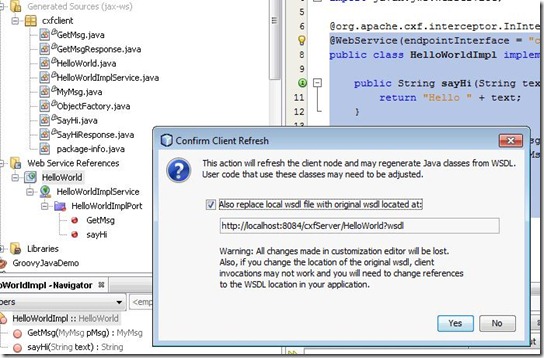
Build the Service and run the project in order to allow the client to refresh its wsdl
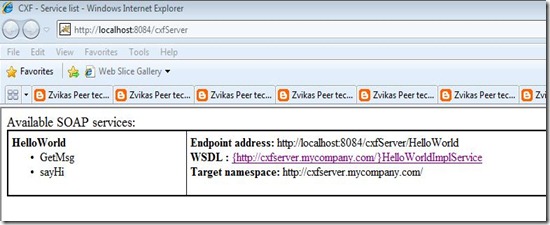
Call to refresh the web service client proxy
Add calls to teh new method in the client :
1: HelloWorldImplService theHelloWorldImplService = new HelloWorldImplService();2:3: HelloWorld theHelloWorld = theHelloWorldImplService.getHelloWorldImplPort();4:5: cxfclient.MyMsg theMyMsg = new MyMsg();6:7: theMyMsg.name = "Zvika";8:9: theMyMsg.age = 42;10:11: theMyMsg = theHelloWorld.getMsg(theMyMsg);12:13: System.out.print(theMyMsg.name + " " + theMyMsg.age);
And the result :
Hello:Zvika 43
יום שישי, 24 במאי 2013
CXF server calls interceptor
In order to apply an interceptor to CXF web service calls an interceptor class that extend the AbstractSoapInterceptor abstract class may be used:
public class WebServiceCallsInterceptor extends AbstractSoapInterceptor{
public WebServiceCallsInterceptor()
{
super(Phase.PRE_INVOKE);
System.out.print("WebServiceCallsInterceptor ctor was called");
}
public void handleMessage(SoapMessage t) throws Fault {
String theSoupMessage = t.toString();
System.out.print(theSoupMessage);
}
}
Note that in the constructor the location of the interceptor in the interceptors calls chain is specified. if the call is done before invoking the method or after and the relevant location in the chain of other interceptors.(using the AddAfter method for an example ).
The SoapMessage object expose a dictionary containing the message meda data for example the request uri can be retreive by calling the request uri:
public void handleMessage(SoapMessage t) throws Fault {
String theRequeseURI = t.get("org.apache.cxf.request.uri").toString();
System.out.print(theRequeseURI);
}
The return value is "/cxfServer/HelloWorld"
public class WebServiceCallsInterceptor extends AbstractSoapInterceptor{
public WebServiceCallsInterceptor()
{
super(Phase.PRE_INVOKE);
System.out.print("WebServiceCallsInterceptor ctor was called");
}
public void handleMessage(SoapMessage t) throws Fault {
String theSoupMessage = t.toString();
System.out.print(theSoupMessage);
}
}
Note that in the constructor the location of the interceptor in the interceptors calls chain is specified. if the call is done before invoking the method or after and the relevant location in the chain of other interceptors.(using the AddAfter method for an example ).
The SoapMessage object expose a dictionary containing the message meda data for example the request uri can be retreive by calling the request uri:
public void handleMessage(SoapMessage t) throws Fault {
String theRequeseURI = t.get("org.apache.cxf.request.uri").toString();
System.out.print(theRequeseURI);
}
The return value is "/cxfServer/HelloWorld"
In order to register the interceptor the interceptor class should be added to the service attributes :
@org.apache.cxf.interceptor.InInterceptors (interceptors = {"com.mycompany.cxfserver.WebServiceCallsInterceptor" })
@WebService(endpointInterface = "com.mycompany.cxfserver.HelloWorld")
public class HelloWorldImpl implements HelloWorld {
public String sayHi(String text) {
return "Hello " + text;
}
}
יום ראשון, 4 בנובמבר 2012
Developing a Web Service using apache CXF
apache cxf מאפשרות לנו בקלות להגדיר web service באמצעות pojo objects
שלב א הגדרת ה Contract package learn.cfx.ws ; import javax.jws.WebService; @WebService public interface IUserDataRepository { @WebMethod void SetUserData ( UserData pUserData); @WebMethod UserData GetUserDataByID ( int pID); }
שימוש ב @WebService על מנת לציין שה interface מגדיר service endpoint interface או contract בלשון wcf
הattribute של @WebMethod מאפשר לעשות קסטומיזציה על הגדרת ה methods של ה interface כגון שם הmethod ב wsdl וכד
שלב ב הגדרת ה payload של UserData package learn.cfx.ws; import javax.xml.bind.annotation.XmlRootElement; @XmlRootElement(name = "UserData") public class UserData { private String mName; private String mID; public UserData() { } public int getID() { return mID; } public void setID(int pID) { this.mID = pID; } public int getName() { return mName; } public void setID(int pName { this.mName = pName; } }
שימוש בספריית Java Architecture for XML Binding
(JAXB)
האנוטציה @XmlRootElement מגדירה את ה root של ה xml המתאר את userdata
ניתן לבצע קסטומיזציה של כל אחד מה properties באמצעות @XmlElement
שלב ג הגדרת ה Service
package learn.cfx.ws ; import javax.jws.WebService; @WebService public class UserDataRepositoryImpl implements IUserDataRepository { public UserDataRepositoryImpl(){ } public void SetUserData ( UserData pUserData){ //do nothing } @WebMethod UserData GetUserDataByID ( int pID){ UserData RetValue = new UserData(); RetValue.setName ("Shaaf Peer"); RetValue.setID (2); return RetValue; } }
שלב ד הגדרת ה Binding באמצעות spring
<beans xmlns="http://www.springframework.org/schema/beans" xmlns:xsi="http://www.w3.org/2001/XMLSchema-instance" xmlns:jaxws="http://cxf.apache.org/jaxws" xsi:schemaLocation=" http://www.springframework.org/schema/beans http://www.springframework.org/schema/beans/spring-beans.xsd http://cxf.apache.org/jaxws http://cxf.apache.org/schemas/jaxws.xsd"> <import resource="classpath:META-INF/cxf/cxf.xml" /> <import resource="classpath:META-INF/cxf/cxf-extension-soap.xml" /> <import resource="classpath:META-INF/cxf/cxf-servlet.xml" /> <jaxws:endpoint id="UserDataRepository" implementor="learn.cfx.ws.UserDataRepositoryImpl" address="/UserDataRepository" /> </beans>
אני בדרך כלל חובב maven על פני ant לכן יש להוריד את ה pom המתאים מהמרשתת על מנת לקבל pom עם מספר הגירסה המעודכן ביותר של cxf
הירשם ל-
רשומות (Atom)