‏הצגת רשומות עם תוויות hadoop. הצג את כל הרשומות

יום חמישי, 17 באפריל 2014

Splitting the reducer output to different Cfs

In one of my projects ,I needed to split the result of the reducer to 3  different Cassandra CFs according to score ranges calculation in the reducer .
The following code is an example of how we did it :

import java.io.IOException;
import java.nio.ByteBuffer;
import java.util.*;
import org.apache.cassandra.db.IColumn;
import org.apache.cassandra.thrift.*;
import org.apache.cassandra.hadoop.*;
import org.apache.cassandra.utils.ByteBufferUtil;
import org.apache.hadoop.conf.*;
import org.apache.hadoop.io.*;
import org.apache.hadoop.mapreduce.*;
import org.apache.hadoop.mapreduce.lib.output.MultipleOutputs;
import org.apache.hadoop.util.*;
public class ScoresBenchMark extends Configured implements Tool {
   
    public static void main(String[] args) throws Exception {
        ToolRunner.run(new Configuration(), new ScoresBenchMark(), args);
        System.exit(0);
    }
  
    public int run(String[] args) throws Exception {
  ConfigHelper.setRangeBatchSize(getConf(), 99);
    
        final Job job = new Job(getConf(), "ScoresBenchMark");
        final Configuration conf = job.getConfiguration();
   
        job.setJarByClass(ScoresBenchMark.class);
        
  job.setMapperClass(Map.class);
  
  //For testing set only one reducer 
        job.setNumReduceTasks(1);
     
        //Handle cassandra input output tables 
  ConfigHelper.setInputRpcPort(conf, "9160");
        
  ConfigHelper.setInputInitialAddress(conf, "127.0.0.1"); //for test using the local host cassandra 
  
        ConfigHelper.setInputPartitioner(conf, "org.apache.cassandra.dht.RandomPartitioner");
        
  ConfigHelper.setInputColumnFamily(conf, "TestDataKS", "RowDataCF");
        
  //get all records
        SlicePredicate predicate = new SlicePredicate().setSlice_range(new SliceRange(ByteBufferUtil.bytes(""), ByteBufferUtil.bytes(""), false, Integer.MAX_VALUE));
        
  ConfigHelper.setInputSlicePredicate(conf, predicate);
    
        ConfigHelper.setOutputInitialAddress(conf, "127.0.0.1");
        
  ConfigHelper.setOutputRpcPort(conf, "9160");
        
  ConfigHelper.setOutputPartitioner(conf, "org.apache.cassandra.dht.RandomPartitioner");
        
  ConfigHelper.setOutputKeyspace(conf, "TestDataKS");
  //Set the 3 tests output CF by the calculation result 
  MultipleOutputs.addNamedOutput(job, "TestScoresCFLow", ColumnFamilyOutputFormat.class, ByteBuffer.class, List.class);
        
  MultipleOutputs.addNamedOutput(job, "TestScoresCFMid", ColumnFamilyOutputFormat.class, ByteBuffer.class, List.class);
  
  MultipleOutputs.addNamedOutput(job, "TestScoresCFHi", ColumnFamilyOutputFormat.class, ByteBuffer.class, List.class);
  
        //set up input as cassandra cf        
        job.setInputFormatClass(ColumnFamilyInputFormat.class);
        
  //Handle the output as cassandra cf 
        
        job.setReducerClass(Reduce.class);
        job.setOutputFormatClass(ColumnFamilyOutputFormat.class);
        job.setMapOutputKeyClass(Text.class);
        job.setMapOutputValueClass(LongWritable.class);
        job.setOutputKeyClass(ByteBuffer.class);
        job.setOutputValueClass(List.class);
    
        job.waitForCompletion(true);
        return 0;
    }
  
    public static class Map extends Mapper<ByteBuffer, SortedMap<ByteBuffer, IColumn>, Text, LongWritable> {  
    
        public void map(ByteBuffer key, SortedMap<ByteBuffer, IColumn> columns, Context context) throws IOException, InterruptedException { 
      
   //Loop over the coloumn data and map key -> value 
            for (IColumn nextCol : columns.values()){
             context.write(new Text(ByteBufferUtil.string(nextCol.name())),
         new LongWritable(ByteBufferUtil.toLong(nextCol.value())));
   }
        }   
    }
  
    public static class Reduce extends Reducer<Text, LongWritable, ByteBuffer, List<Mutation>> {
 
        private MultipleOutputs _output;
        public void setup(Context context) {
            _output = new MultipleOutputs(context);
        }
        public void cleanup(Context context) throws IOException, InterruptedException {
            _output.close();
        }
    
        public void reduce(Text key, Iterable<LongWritable> values, Context context) throws IOException, InterruptedException {
   for ( ICalculator nextCalcolator in mCalculators )
   {
    float theScore = nextCalcolator.Calc (values) ;
    String theCalculatorName = nextCalcolator.Class.ToString ();
    Column c = new Column();
            
    c.setName(ByteBufferUtil.bytes(theCalculatorName));
    c.setValue(ByteBufferUtil.bytes(theScore);
    c.setTimestamp(System.currentTimeMillis());
    Mutation m = new Mutation();
    m.setColumn_or_supercolumn(new ColumnOrSuperColumn());
    m.column_or_supercolumn.setColumn(c);
    
    if ( theScore < 30 )
    {
     TestScoresCFMid_output.write("TestScoresCFLow", ByteBufferUtil.bytes(key.toString()), Collections.singletonList(m));
    } 
    else if ( theScore > 74 )
    {
     TestScoresCFMid_output.write("TestScoresCFHi", ByteBufferUtil.bytes(key.toString()), Collections.singletonList(m));
    }
    else 
    {
     TestScoresCFMid_output.write("TestScoresCFMid", ByteBufferUtil.bytes(key.toString()), Collections.singletonList(m));
    }
    
   }
        }
    }
}

References :
https://gist.githubusercontent.com/rstrickland/3763728/raw/7bb0b6d9211bc99e58ca222161e8b31db799a2d5/mo_example.java
http://modular.math.washington.edu/home/wstein/www/home/was/tmp/apache-cassandra-1.1.3/javadoc/org/apache/cassandra/thrift/Mutation.html
http://ng911dev1.cs.columbia.edu/docs/cassandra/org/apache/cassandra/thrift/SlicePredicate.html
http://hadoop.apache.org/docs/r2.3.0/api/org/apache/hadoop/mapreduce/lib/output/MultipleOutputs.html
http://svn.apache.org/repos/asf/cassandra/trunk/src/java/org/apache/cassandra/hadoop/ColumnFamilyOutputFormat.java

יום ראשון, 16 ביוני 2013

Compile hadoop jar using NetBeans

I have compiled the Hadoop WordCount sample using NetBeans.
Compiling Hadoop jar using netbeans is very simple procedure.
Create a simple Java SE project and include the map reduce code i
Include the Hadoop-core-1.1.2. jars in the project path

5

Set the main in the main class correctly


4

Build the project and copy the Jar to your execution directory (local not in the HDFS ).

Creating the Directories in the HDFS
zvika@ubuntu:~/myStaff/Hadoop/hadoop-1.1.2$ bin/hadoop dfs -mkdir /tmp/hadoop-zvika/Input
zvika@ubuntu:~/myStaff/Hadoop/hadoop-1.1.2$ bin/hadoop dfs -mkdir /tmp/hadoop-zvika/output

Copy the Test Data from local HD to HDFS
hadoop dfs -copyFromLocal myTestFiles/input1  /tmp/hadoop-zvika/Input

Executing the jar file
zvika@ubuntu:~/myStaff/Hadoop/hadoop-1.1.2$ bin/hadoop jar MyWordCount.jar  /tmp/hadoop-zvika/Input /tmp/hadoop-zvika/Output

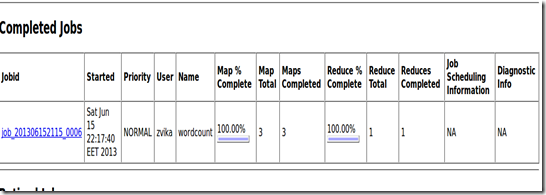
The job report
3

The Results

1

יום שלישי, 11 ביוני 2013

Executing the hadoop samples

I keep on follow the Single node setup document.
I call to copy from the local system to the HDFS th config folder
bin/hadoop fs -put conf input
The result can be found using the
NameNode page - http://localhost:50070/ 
The files are list in: /user/zvika/input directory
Note that each file Block Size is 64MB the user is zvika and the Group is supergroup

I execute the samples using :
 zvika@ubuntu:~/myStaff/Hadoop/hadoop-1.1.2$ bin/hadoop jar hadoop-examples-*.jar grep input output 'dfs[a-z.]+'

The result is a very long list :

13/06/11 21:51:08 INFO util.NativeCodeLoader: Loaded the native-hadoop library
13/06/11 21:51:08 WARN snappy.LoadSnappy: Snappy native library not loaded
13/06/11 21:51:08 INFO mapred.FileInputFormat: Total input paths to process : 20
13/06/11 21:51:09 INFO mapred.JobClient: Running job: job_201306112139_0001
13/06/11 21:51:10 INFO mapred.JobClient:  map 0% reduce 0%
13/06/11 21:51:14 INFO mapred.JobClient:  map 10% reduce 0%
13/06/11 21:51:16 INFO mapred.JobClient:  map 15% reduce 0%
13/06/11 21:51:17 INFO mapred.JobClient:  map 20% reduce 0%
13/06/11 21:51:18 INFO mapred.JobClient:  map 25% reduce 0%
13/06/11 21:51:19 INFO mapred.JobClient:  map 30% reduce 0%
13/06/11 21:51:20 INFO mapred.JobClient:  map 40% reduce 0%
13/06/11 21:51:21 INFO mapred.JobClient:  map 45% reduce 0%
13/06/11 21:51:22 INFO mapred.JobClient:  map 50% reduce 0%
13/06/11 21:51:23 INFO mapred.JobClient:  map 55% reduce 13%
13/06/11 21:51:24 INFO mapred.JobClient:  map 60% reduce 13%
13/06/11 21:51:25 INFO mapred.JobClient:  map 65% reduce 13%
13/06/11 21:51:26 INFO mapred.JobClient:  map 70% reduce 13%
13/06/11 21:51:27 INFO mapred.JobClient:  map 80% reduce 13%
13/06/11 21:51:28 INFO mapred.JobClient:  map 85% reduce 13%
13/06/11 21:51:29 INFO mapred.JobClient:  map 90% reduce 13%
13/06/11 21:51:30 INFO mapred.JobClient:  map 100% reduce 13%
13/06/11 21:51:32 INFO mapred.JobClient:  map 100% reduce 23%
13/06/11 21:51:34 INFO mapred.JobClient:  map 100% reduce 100%
13/06/11 21:51:34 INFO mapred.JobClient: Job complete: job_201306112139_0001
13/06/11 21:51:34 INFO mapred.JobClient: Counters: 30
13/06/11 21:51:34 INFO mapred.JobClient:   Job Counters
13/06/11 21:51:34 INFO mapred.JobClient:     Launched reduce tasks=1
13/06/11 21:51:34 INFO mapred.JobClient:     SLOTS_MILLIS_MAPS=33979
13/06/11 21:51:34 INFO mapred.JobClient:     Total time spent by all reduces waiting after reserving slots (ms)=0
13/06/11 21:51:34 INFO mapred.JobClient:     Total time spent by all maps waiting after reserving slots (ms)=0
13/06/11 21:51:34 INFO mapred.JobClient:     Launched map tasks=20
13/06/11 21:51:34 INFO mapred.JobClient:     Data-local map tasks=20
13/06/11 21:51:34 INFO mapred.JobClient:     SLOTS_MILLIS_REDUCES=19571
13/06/11 21:51:34 INFO mapred.JobClient:   File Input Format Counters
13/06/11 21:51:34 INFO mapred.JobClient:     Bytes Read=29676
13/06/11 21:51:34 INFO mapred.JobClient:   File Output Format Counters
13/06/11 21:51:34 INFO mapred.JobClient:     Bytes Written=180
13/06/11 21:51:34 INFO mapred.JobClient:   FileSystemCounters
13/06/11 21:51:34 INFO mapred.JobClient:     FILE_BYTES_READ=82
13/06/11 21:51:34 INFO mapred.JobClient:     HDFS_BYTES_READ=31840
13/06/11 21:51:34 INFO mapred.JobClient:     FILE_BYTES_WRITTEN=1081971
13/06/11 21:51:34 INFO mapred.JobClient:     HDFS_BYTES_WRITTEN=180
13/06/11 21:51:34 INFO mapred.JobClient:   Map-Reduce Framework
13/06/11 21:51:34 INFO mapred.JobClient:     Map output materialized bytes=196
13/06/11 21:51:34 INFO mapred.JobClient:     Map input records=843
13/06/11 21:51:34 INFO mapred.JobClient:     Reduce shuffle bytes=196
13/06/11 21:51:34 INFO mapred.JobClient:     Spilled Records=6
13/06/11 21:51:34 INFO mapred.JobClient:     Map output bytes=70
13/06/11 21:51:34 INFO mapred.JobClient:     Total committed heap usage (bytes)=3346661376
13/06/11 21:51:34 INFO mapred.JobClient:     CPU time spent (ms)=5060
13/06/11 21:51:34 INFO mapred.JobClient:     Map input bytes=29676
13/06/11 21:51:34 INFO mapred.JobClient:     SPLIT_RAW_BYTES=2164
13/06/11 21:51:34 INFO mapred.JobClient:     Combine input records=3
13/06/11 21:51:34 INFO mapred.JobClient:     Reduce input records=3
13/06/11 21:51:34 INFO mapred.JobClient:     Reduce input groups=3
13/06/11 21:51:34 INFO mapred.JobClient:     Combine output records=3
13/06/11 21:51:34 INFO mapred.JobClient:     Physical memory (bytes) snapshot=4006256640
13/06/11 21:51:34 INFO mapred.JobClient:     Reduce output records=3
13/06/11 21:51:34 INFO mapred.JobClient:     Virtual memory (bytes) snapshot=22421676032
13/06/11 21:51:34 INFO mapred.JobClient:     Map output records=3
13/06/11 21:51:34 INFO mapred.FileInputFormat: Total input paths to process : 1
13/06/11 21:51:34 INFO mapred.JobClient: Running job: job_201306112139_0002
13/06/11 21:51:35 INFO mapred.JobClient:  map 0% reduce 0%
13/06/11 21:51:38 INFO mapred.JobClient:  map 100% reduce 0%
13/06/11 21:51:45 INFO mapred.JobClient:  map 100% reduce 33%
13/06/11 21:51:47 INFO mapred.JobClient:  map 100% reduce 100%
13/06/11 21:51:47 INFO mapred.JobClient: Job complete: job_201306112139_0002
13/06/11 21:51:47 INFO mapred.JobClient: Counters: 30
13/06/11 21:51:47 INFO mapred.JobClient:   Job Counters
13/06/11 21:51:47 INFO mapred.JobClient:     Launched reduce tasks=1
13/06/11 21:51:47 INFO mapred.JobClient:     SLOTS_MILLIS_MAPS=3134
13/06/11 21:51:47 INFO mapred.JobClient:     Total time spent by all reduces waiting after reserving slots (ms)=0
13/06/11 21:51:47 INFO mapred.JobClient:     Total time spent by all maps waiting after reserving slots (ms)=0
13/06/11 21:51:47 INFO mapred.JobClient:     Launched map tasks=1
13/06/11 21:51:47 INFO mapred.JobClient:     Data-local map tasks=1
13/06/11 21:51:47 INFO mapred.JobClient:     SLOTS_MILLIS_REDUCES=8441
13/06/11 21:51:47 INFO mapred.JobClient:   File Input Format Counters
13/06/11 21:51:47 INFO mapred.JobClient:     Bytes Read=180
13/06/11 21:51:47 INFO mapred.JobClient:   File Output Format Counters
13/06/11 21:51:47 INFO mapred.JobClient:     Bytes Written=52
13/06/11 21:51:47 INFO mapred.JobClient:   FileSystemCounters
13/06/11 21:51:47 INFO mapred.JobClient:     FILE_BYTES_READ=82
13/06/11 21:51:47 INFO mapred.JobClient:     HDFS_BYTES_READ=297
13/06/11 21:51:47 INFO mapred.JobClient:     FILE_BYTES_WRITTEN=101471
13/06/11 21:51:47 INFO mapred.JobClient:     HDFS_BYTES_WRITTEN=52
13/06/11 21:51:47 INFO mapred.JobClient:   Map-Reduce Framework
13/06/11 21:51:47 INFO mapred.JobClient:     Map output materialized bytes=82
13/06/11 21:51:47 INFO mapred.JobClient:     Map input records=3
13/06/11 21:51:47 INFO mapred.JobClient:     Reduce shuffle bytes=82
13/06/11 21:51:47 INFO mapred.JobClient:     Spilled Records=6
13/06/11 21:51:47 INFO mapred.JobClient:     Map output bytes=70
13/06/11 21:51:47 INFO mapred.JobClient:     Total committed heap usage (bytes)=220528640
13/06/11 21:51:47 INFO mapred.JobClient:     CPU time spent (ms)=790
13/06/11 21:51:47 INFO mapred.JobClient:     Map input bytes=94
13/06/11 21:51:47 INFO mapred.JobClient:     SPLIT_RAW_BYTES=117
13/06/11 21:51:47 INFO mapred.JobClient:     Combine input records=0
13/06/11 21:51:47 INFO mapred.JobClient:     Reduce input records=3
13/06/11 21:51:47 INFO mapred.JobClient:     Reduce input groups=1
13/06/11 21:51:47 INFO mapred.JobClient:     Combine output records=0
13/06/11 21:51:47 INFO mapred.JobClient:     Physical memory (bytes) snapshot=296771584
13/06/11 21:51:47 INFO mapred.JobClient:     Reduce output records=3
13/06/11 21:51:47 INFO mapred.JobClient:     Virtual memory (bytes) snapshot=2142064640
13/06/11 21:51:47 INFO mapred.JobClient:     Map output records=3


To examine the hadoop job processing go to http://ubuntu:50060/tasktracker.jsp and refresh while executing  the JOB

יום שבת, 8 ביוני 2013

Hadoop single node setup

I order to install Hadoop single node in a pseudo-distributed mode where each Hadoop daemon runs in a separate Java process I follow the following article: http://hadoop.apache.org/docs/stable/single_node_setup.html
Note:Setting the JAVA_HOME to: /usr/lib/jvm/java-1.6.0-openjdk by using the following property value:
export JAVA_HOME=/usr/lib/jvm/java-1.6.0-openjdk
in the configuration file is necessary.

set the conf/core-site.xml ,conf/hdfs-site.xml ,conf/mapred-site.xml according to the article in order to allow Hadoop to work correctly.

Follow the logs files in case of error or failure.

Resources:
http://hadoop.apache.org/docs/stable/single_node_setup.html 
 
http://stackoverflow.com/questions/8827102/hadoop-error-java-home-is-not-set

יום חמישי, 16 במאי 2013

Video processing algorithm benchmark using Hadoop

Developing a video processing algorithm involved a repeatable process of running a benchmarks in order to test the algorithm after every minor change.
Because often the video movies samples DB is huge  the execution time of a benchmark phase may be time consuming. 
In order to minimize the developer  waiting time for results /feedback about it’s algorithm changes  we used to run the algorithm benchmark in parallel using apache Hadoop.

Hadoop is suitable for this mission for the following reasons:
1.The tests for each video movie sample is independent from each other only after all the videos movies samples were tests we are calculating the current algorithm version mark.
2.The video movies samples db is huge currently larger the 20T .
3.There is no seeking or searching process over the DB all the data is processed sequentially.
4.The benchmark process is very CPU/ GPU resources consumer.
5.The video Samples DB is very static only insert of new samples no updates merely deleted of video samples.

Notes:
1.Although Hadoop is Java oriented there is no problem to use  other programming languages in order to implement the map / reducer .
2.A single  video  samples sizes  for the mapper should fit its optimal size (no 3 hour movie).
3.We start by storing uncompressed video samples (AVI) in the HDFS in order to void the uncompressing process but the size  of the samples were too large so we had to compress the video into mpeg chunk with low compression factor.

The parts that take place in the benchmark are :
Input splitter:
The duty of the input splitter is to read the row data from the HDFS and generate a logical structure that contains un compressed video movie chunk to be test , reference data for algorithm mark calculations (for an example in face recognition process a result made by human  ) .
In order to accomplish this we developed a custom inputformat input splitter and record reader .
The input splitter is a static component that merely changed .

Mapper:
The mapper duty is to execute the algorithm against the video sample producing the results and debug data  .For an example if the benchmark is testing face recognition the results of the mapper phase is a collection of faces that were detected , the detection time reference for comparing the results
for each movie chunk there is a unique mark indicate the algorithm performance against it.
The mapper is the dynamic component of the process it is changed for every execution.
The mapper contains reference to a DB containing reference data used to perform compeering algorithm

Reducer
The Reducer phase duty is to accumulate the marks  for the algorithms based on the mapper results.

Notes:
The process contains Partition & Shuffle units used to group map result with specific characteristics.
At the end of the process a report is created and  send to the developer and stored in a db referencing the algorithm version.