‏הצגת רשומות עם תוויות Ruby. הצג את כל הרשומות

יום רביעי, 21 במאי 2014

Ruby define_method simple sample‏

The following Ruby code demonstrates the use of rubies define_method in order to define methods dynamically.

class MyCls
      %w(getData1 getData2).each do |meth|
      define_method(meth) {
        @data[meth.to_sym] = @data[:User] * 2
        @data[meth.to_sym]
        }
  def initialize()
    @data = {}
    @data[:User]= 15 
    end
  end
end
theMyCls = MyCls.new()
puts  theMyCls.getData2
 

Resources
#http://ruby-doc.org/core-2.0/Module.html#method-i-define_method
#http://www.trottercashion.com/2011/02/08/rubys-define_method-method_missing-and-instance_eval.html

יום שבת, 7 בספטמבר 2013

Ruby –The Redo command

Ruby has a three loop controlling command : Break , Next and Redo ,while the Break and the Next command has equivalents in all other languages Redo is unique to Ruby .

Redo acts like next except it doesn't evaluate the while condition .

example:

  1: while line = gets

  2: puts line 

  3: break if line =~ /^STOP/ # stop at end

  4: redo if line.gsub!(/^STO/) { line = 'STOP'}

  5: end

The result :
ee
ee
sto
sto
STO
STO
STOP

יום שישי, 12 ביולי 2013

unless in Ruby

The unless is ruby is equivalents to if not
Sample code

  1:   fileName = 'C:\\learn\\Ruby\\TestFiles\\myTest.txt'
  2:   f = File.open(fileName, "r") 
  3:   f.each_line do |line|
  4:   next unless line =~ /\d{2,6}/ # Skip lines with no numbers with len < 2 
  5:     puts line
  6:   end

Input data
13333333333333333333333333333
2
3
4
Zvika
5
6
7
Shaaf


And the result
C:\learn\Ruby>test5.rb
2
3
4
Zvika
5
6
7
Shaaf

יום חמישי, 27 ביוני 2013

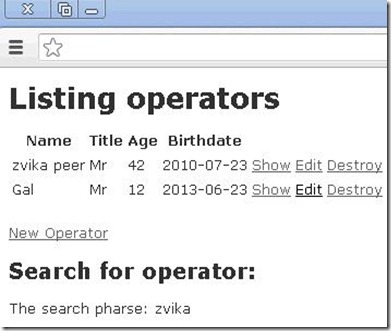
Start handle the searching in ROR

The modal

  1: class SearchFor < ActiveRecord::Base
  2:   attr_accessible :pharse
  3: end
  4: 

The controller

  1: class OperatorsController < ApplicationController
  2:   # GET /operators
  3:   # GET /operators.json
  4:   def index
  5:     @operators = Operator.all
  6:     @searchP  = SearchFor.new 
  7:   @searchP.pharse = "zvika"
  8:   
  9:     respond_to do |format|
 10:       format.html # index.html.erb
 11:       format.json { render json: @operators }
 12:     
 13:   end
 14:   end

The view

  1: <h2>Search for operator:</h2>
  2: 
  3:  <div class="field">
  4:     <p>The search pharse: <%= @searchP.pharse%><br /></p>
  5:  </div>
  6: 

The result
http://localhost:3000/operators
Capture41

יום שישי, 21 ביוני 2013

using generate scaffold

I wanted to create the MVC template for the operators in my Rails application.
I used the scaffold in order to generate the template: 

C:\learn\Ruby\ror\operators>rails generate scaffold Operator name:string title:s
tring age:integer  birthDate:date

The scaffold routine create the following artifacts:

       invoke  active_record
      create    db/migrate/20130616075217_create_operators.rb
      create    app/models/operator.rb
      invoke    test_unit
      create      test/unit/operator_test.rb
      create      test/fixtures/operators.yml
      invoke  resource_route
       route    resources :operators
      invoke  scaffold_controller
      create    app/controllers/operators_controller.rb
      invoke    erb
      create      app/views/operators
      create      app/views/operators/index.html.erb
      create      app/views/operators/edit.html.erb
      create      app/views/operators/show.html.erb
      create      app/views/operators/new.html.erb
      create      app/views/operators/_form.html.erb
      invoke    test_unit
      create      test/functional/operators_controller_test.rb
      invoke    helper
      create      app/helpers/operators_helper.rb
      invoke      test_unit
      create        test/unit/helpers/operators_helper_test.rb
      invoke  assets
      invoke    coffee
      create      app/assets/javascripts/operators.js.coffee
      invoke    scss
      create      app/assets/stylesheets/operators.css.scss
      invoke  scss
      create    app/assets/stylesheets/scaffolds.css.scss

The operator model contains 4 members

The generated DB migration code :found in C:\learn\Ruby\ror\operators\db\migrate\20130616075217_create_operators.rb

  1: class CreateOperators < ActiveRecord::Migration
  2:   def change
  3:     create_table :operators do |t|
  4:       t.string :name
  5:       t.string :title
  6:       t.integer :age
  7:       t.date :birthDate
  8: 
  9:       t.timestamps
 10:     end
 11:   end
 12: end
 13: 

Execute the migration
C:\learn\Ruby\ror\operators>rake db:migrate


Capture35JPG 


The Result in the mySQL DB


Capture37


Changing the main controller to add link to the operator controller :
<h1>Operators </h1>
<p>Operator: <%= @theOperator.Name %></p>
<%= link_to "Operators", operators_path %>


Resources
http://overooped.com/post/100354794/ruby-script-generate-scaffold-typeshttp://guides.rubyonrails.org/getting_started.html

Ruby and Regex

Play with regex in ruby

  1: theStrToCheck = "I have found 164  elephants in my garden last week. my email is loveme42@hotmail.com "
  2: thePos = (/elephants/ =~ theStrToCheck)
  3: puts  thePos
  4: puts theStrToCheck 
  5: 


returns 18 if no match return nothing.

  1: theStrToCheck = "I have found 164  elephants in my garden last week. my email is loveme42@hotmail.com */ "
  2: thePos = (/ \*\// =~ theStrToCheck)
  3: puts  thePos

returns 84 note about the \ to follow special characters.

  1: theStrToCheck = "I have found 164  elephants in my garden last week.next 164  my email is loveme42@hotmail.com */ "
  2: thePosOfNumber = (/\d\d\d/ =~ theStrToCheck)
  3: puts  thePosOfNumber
  4: 
  5: thePosOfNumber = (/(\d){2} / =~ theStrToCheck)
  6: puts  thePosOfNumber
  7: 
  8: puts theStrToCheck

The results are 13 , 14
The first match sequence of  3 digits
The second match 2 digits with space after them.

יום חמישי, 6 ביוני 2013

Declare ruby struct

A Ruby code that's demonstrating creating  a struct.

  1: myTestArray = []
  2: 
  3: myTestArray[0] = 'Mr Peer Zvika 42'
  4: 
  5: myTestArray[1] = 'Mrs Peer Dalit 42'
  6: 
  7: puts myTestArray
  8: 
  9: Persons = Struct.new(:title, :Family, :name, :age)
 10: 
 11: personsArray = []
 12: 
 13: myTestArray.each do |nextOne|
 14:   title, Family, name, age = nextOne.chomp.split(' ')
 15:   
 16:   personsArray << Persons.new(title, Family, name, age)
 17: end
 18: 
 19: puts personsArray
 20: 

יום ראשון, 2 ביוני 2013

Custom button in gtk

A simple GTK program that demonstrate the constructing of custom button.

  1: require 'gtk'
  2: require 'gdk_pixbuf'
  3: 
  4: #Returns image from image file 
  5: def load_image_from_file(file_path)
  6:     
  7:   pixbuf = Gdk::Pixbuf.new file_path
  8:     
  9:   pixmap, mask = pixbuf.render_pixmap_and_mask
 10:     
 11:   image  = Gtk::Pixmap.new(pixmap, mask)
 12: end
 13: 
 14: window = Gtk::Window.new Gtk::WINDOW_TOPLEVEL
 15: 
 16: window.signal_connect('delete_event') { Gtk.main_quit }
 17: 
 18: window.border_width 20
 19: 
 20: window.set_title "Custom button"
 21: 
 22: button = Gtk::Button.new
 23: 
 24: vbox = Gtk::VBox.new
 25: 
 26: button.add vbox
 27: 
 28: label = Gtk::Label.new "Press the Lion bellow"
 29: 
 30: vbox.pack_start label
 31: 
 32: image = load_image "Lion.png"
 33: 
 34: vbox.pack_start image
 35: 
 36: window.add button
 37: 
 38: window.show_all
 39: 
 40: Gtk.main

Sources:
http://ruby-gnome.sourceforge.net/tutorial/c429.html
http://zetcode.com/tutorials/gtktutorial/gtkevents/

יום רביעי, 29 במאי 2013

Ruby and Set

  1: require 'set'
  2: 
  3: mySet = Set.new ["Orange","Banana","Kivy"]
  4: 
  5: mySet.each {|nextFruit| puts nextFruit}
  6: 
  7: puts mySet.inspect
  8: 
  9: puts "Done"

Returns:
Orange
Banana
Kivy
#<Set: {"Orange", "Banana", "Kivy"}>
Done
Dividing the set into smaller set by condition


  1: require 'set'
  2: 
  3: mySet = Set.new ["Orange","Banana","Kivy","Limon","Mango"]
  4: 
  5: dsets = mySet.divide { |fr1,fr2| fr1.length == fr2.length }
  6: 
  7: dsets.each {|nextSet| puts nextSet.inspect}
  8: 
  9: puts "Done"

Returns
I:\Learn\Ruby>myRuby7
#<Set: {"Orange", "Banana"}>
#<Set: {"Kivy"}>
#<Set: {"Limon", "Mango"}>
Done

יום ראשון, 26 במאי 2013

Redis Simple

loading the Radis local server :
zvika@ubuntu:~$ redis-server

Check if the Redis Server is alive :
zvika@ubuntu:~$ redis-cli ping
PONG

Simple get set  commands to redis in redis client shell

zvika@ubuntu:~$ redis-cli
redis 127.0.0.1:6379> set myName Zvika
OK
redis 127.0.0.1:6379> get myName 
"Zvika"
redis 127.0.0.1:6379> 

Use the Radis RB as interface between Radis and Ruby
https://github.com/redis/redis-rb

Print
Ruby default require path:
ruby -e 'puts $:' 

Simple Ruby program that’s interacts with Redis


require 'rubygems'
require 'redis'
require 'json'
r = Redis.new
#Check if Radis server is alive
puts  (r.ping)
#Simple Set Get operation 
r.set('Age','42')
puts (r.get('Age'))
#Use Json lib in order to convert form json to string 
#and the oposite direction 
r.set "Data", {'Family'=>'Peer'}.to_json
theJasonObject = JSON.load (r.get('Data'))
puts (theJasonObject['Family'])

יום שישי, 24 במאי 2013

Templating discovery message in Ruby

In order to template  the discovery message in ruby we manipulate the template string using XML.
The following code convert the template from string to XML , manipulate the service name and name space and convert it back to string representation .

require 'rexml/document'

def TempalteProbeMsg (pMsg)
    doc = REXML::Document.new(pMsg)
   
    theElment = doc.root.elements['s:Body/Probe/d:Types']
   
    theElment.text = 'dp0:IMyServiceToProbe'
   
    theElment.attributes["xmlns:dp0"] ="Com.myCompany.Services"
   
    return   doc.root.to_s
   
end
The probe message before templating
envelope" xmlns:a="http://www.w3.org/2005/08/addressing">
  <s:Header>
    <a:Action s:mustUnderstand="1">http://docs.oasis-open.org/ws-dd/ns/discovery/2009/01/Hello</a:Action>
    <h:AppSequence InstanceId="1369239226" MessageNumber="1" xmlns:h="http://docs.oasis-open.org/ws-dd/ns/discovery/2009/01"/>
    <a:MessageID>urn:uuid:bc95d269-a20f-4d7b-b5bd-c31698dd9569</a:MessageID>
    <a:To s:mustUnderstand="1">urn:docs-oasis-open-org:ws-dd:ns:discovery:2009:01</a:To>
  </s:Header>
  <s:Body>
    <Hello xmlns="http://docs.oasis-open.org/ws-dd/ns/discovery/2009/01">
      <a:EndpointReference>
        <a:Address>http://localhost:8989/myService</a:Address>
      </a:EndpointReference>
      <d:Types xmlns:d="http://docs.oasis-open.org/ws-dd/ns/discovery/2009/01" xmlns:dp0="Com.myCompany.Services">dp0:IMyServiceAlias</d:Types>
      <XAddrs>http://localhost:8989/myService</XAddrs>
      <MetadataVersion>0</MetadataVersion>
    </Hello>
  </s:Body>
</s:Envelope>
The probe message after templating
<s:Envelope xmlns:a='http://www.w3.org/2005/08/addressing' xmlns:s='http://www.w
3.org/2003/05/soap-envelope'>
    <s:Header>
      <a:Action s:mustUnderstand='1'>http://docs.oasis-open.org/ws-dd/ns/discove
ry/2009/01/Probe</a:Action>
      <a:MessageID>urn:uuid:4faf9212-2449-43bd-9cfb-9cf8b12300d1</a:MessageID>
      <a:ReplyTo>
        <a:Address>http://www.w3.org/2005/08/addressing/anonymous</a:Address>
      </a:ReplyTo>
      <a:To s:mustUnderstand='1'>urn:docs-oasis-open-org:ws-dd:ns:discovery:2009
:01</a:To>
    </s:Header>
    <s:Body>
      <Probe xmlns='http://docs.oasis-open.org/ws-dd/ns/discovery/2009/01'>
        <d:Types xmlns:d='http://docs.oasis-open.org/ws-dd/ns/discovery/2009/01'
xmlns:dp0='Com.myCompany.Services'>dp0:IMyServiceToProbe</d:Types>
        <Duration xmlns='http://schemas.microsoft.com/ws/2008/06/discovery'>PT5S
</Duration>
      </Probe>
    </s:Body>
  </s:Envelope>

Send Hard coded discovery message using Ruby

The following Ruby code loads a Discovery probe message from a file and send it as  multicast udp message to the discovery proxy address
require "socket"
require "ipaddr"

MULTICAST_ADDR = "239.255.255.250"
PORT = 3702

def get_file_as_string(filename)
data = ''
f = File.open(filename, "r")
f.each_line do |line|
data += line
end
return data
end

def SendDiscoveryProbeMsg (pMsg)

socket = UDPSocket.open

socket.setsockopt(Socket::IPPROTO_IP, Socket::IP_MULTICAST_TTL, 10)

socket.send(pMsg, 0, MULTICAST_ADDR, PORT)

socket.close
end

theTemplateTxt = get_file_as_string 'DescoveryProbeTemplate.xml'

puts theTemplateTxt

SendDiscoveryProbeMsg theTemplateTxt
The Message is :


<
s:Envelope xmlns:s="http://www.w3.org/2003/05/soap-envelope" xmlns:a="http://www.w3.org/2005/08/addressing">
<s:Header>
<a:Action s:mustUnderstand="1">http://docs.oasis-open.org/ws-dd/ns/discovery/2009/01/Probe</a:Action>
<a:MessageID>urn:uuid:4faf9212-2449-43bd-9cfb-9cf8b12300d1</a:MessageID>
<a:ReplyTo>
<a:Address>http://www.w3.org/2005/08/addressing/anonymous</a:Address>
</a:ReplyTo>
<a:To s:mustUnderstand="1">urn:docs-oasis-open-org:ws-dd:ns:discovery:2009:01</a:To>
</s:Header>
<s:Body>
<Probe xmlns="http://docs.oasis-open.org/ws-dd/ns/discovery/2009/01">
<d:Types xmlns:d="http://docs.oasis-open.org/ws-dd/ns/discovery/2009/01" xmlns:dp0="http://Microsoft.Samples.Discovery">dp0:ICalculatorService</d:Types>
<Duration xmlns="http://schemas.microsoft.com/ws/2008/06/discovery">PT5S</Duration>
</Probe>
</s:Body>
</s:Envelope>

יום רביעי, 15 במאי 2013

Ruby case

In ruby there is an option to use case command without a leading variable that is checked in every “when” statement.
The conditions in the case  may not be related one to the other.
When the first condition is true all the conditions that weren’t check yet  are neglected.

for an example:

class Song
     def name
    @name
  end

  def name=(str)
    @name = str
  end
    
  attr_accessor :Artist
end

song =  Song.new
song.name = "Love is love"
song.Artist = "Shlomo Artzi"

case
    when song.name == "Love is love"
        puts "Me and Eti song !"
    when song.Artist == "Boy gorge"
        puts "This is the artist form electric dreams"
    when Time.now.hour > 23
        puts "I should goto sleep"
    else
        puts "default value is selected "
end
 

יום ראשון, 12 במאי 2013

Displaying a window using ruby and gtk

require 'gtk'

window = Gtk::Window.new(Gtk::WINDOW_TOPLEVEL)

pressmebtn = Gtk::Button.new("Press me please!!")

window.set_title("Displaying a window using ruby and gtk on linux")

window.border_width(5)

# Connect the signals 'destroy_event'
window.signal_connect('destroy') {
puts "destroy event received"
Gtk.main_quit
}

# Connect the button to a callback.
pressmebtn.signal_connect('clicked') { puts "pressmebtn was clicked" }

# Connect the signals 'delete_event'
window.signal_connect('delete_event') {
puts "delete_event received"
false
}

window.add button
window.show_all
Gtk.main