יום שישי, 7 ביוני 2013

ApplicationContext loading

There is two ways to load application context xml file  in spring: classpathxmlapplicationcontext or filesystemxmlapplicationcontext.

FileSystemXmlApplicationContext:
Loads the application context acoording to a full path for an example 

  1: ApplicationContext context = new FileSystemXmlApplicationContext(
  2:    "I:\\Learn\\java\\maven\\executableJar\\mavenToExeJar\\SpringXMLConfig.xml");

The current path can be obtained by :


  1:   final String dir = System.getProperty("user.dir");
  2:         System.out.println("current dir = " + dir);

classpathxmlapplicationcontext
The spring application context should be in the CLASSPATH
Getting the current class path can be done  by:


  1: String theClassPath = System.getProperty("java.class.path");
  2: System.out.println("theClassPath dir = " + theClassPath);
  3: 

An example for using classpathxmlapplicationcontext :


  1: ApplicationContext context = new ClassPathXmlApplicationContext (
  2:         "SpringXMLConfig.xml");

Resources
http://en.wikipedia.org/wiki/Classpath_(Java)
http://codeissue.com/issues/i84e1f376448bef/classpathxmlapplicationcontext-vs-filesystemxmlapplicationcontext

יום חמישי, 6 ביוני 2013

Sprint Context File is packed to

When creating an executable jar of spring project
Capture27
The jar packing procedure may pack the spring context file as well.
So the jar file will contain the file and the program that use spring will load the context from the context file in the jar bundle.
The context file / files should be exclude from the jar in order to allow the configurability  and deploy to the jar directory before executing the jar .

Camel Bean method invocation

In order to use camel to invoke method of a service like in WCF we can use camel methods bean invocations.
Construct a bean with methods :
For an example :

  1: package org.apache.camel.example.console;
  2: 
  3: public class myService {
  4:   public void  SayHello (String pMsg)
  5:   {
  6:     
  7:     System.out.print( "Hello:" + pMsg);
  8:   }
  9:   public void  SayGoodBy (String pMsg)
 10:   {
 11:     System.out.print("Goodby:" + pMsg);
 12:   }
 13:   
 14: }

The camel route:


  1:   CamelContext context = new DefaultCamelContext();  
  2:       context.addRoutes(new RouteBuilder() {
  3:         public void configure() {
  4:           from("stream:in?promptMessage=Enter something please :").
  5:             bean(myService.class, "SayHello");

  The SayHello method will be invoked.


selecting the bean method using an header.

  1: CamelContext context = new DefaultCamelContext();  
  2:       context.addRoutes(new RouteBuilder() {
  3:         public void configure() {
  4:           from("stream:in?promptMessage=Enter something please :").
  5:           setHeader("CamelBeanMethodName", constant("SayGoodBy")).
  6:             bean(myService.class);

And the Result is invoking the SayGoodBy method:


Enter something please :This is a test
Goodby:This is a test

cypher “with” command

In order to perform aggregation method in Cypher query  the just in time nature of the language where the query process append only when the query results are fetched should be break.
For an example if we wants to find out only nodes that has 0..n connections we should sum all the connections of all nodes and only when finished iterate all the nodes  filter the nodes with connection > 0 .
Chpher uses the with statement in order to notify the query engine to execute the query parts before it call the other part .

The following sample works with the bruce willis db from prev samples.
The execution of the querey:

  1: theCyperCode = "START n=node(*) MATCH n-[]->ConnectedNode WITH n, count(ConnectedNode) as ConnectedNodeCount WHERE ConnectedNodeCount > 0 RETURN n, ConnectedNodeCount"
  2: 
  3: cypher.execute(graph_db, theCyperCode, row_handler=handle_row)
  4: 

The callback method


  1: def handle_row(row):
  2:     print ("cypher query result:")
  3:     node = row[0]
  4:     print (node)
  5:     print (row[1])

The result :


cypher query result:
(467 {"name":"John McClane"})
2
cypher query result:
(3 {"name":"Alan Rickman"})
1
cypher query result:
(933 {"name":"John McClane"})
2
cypher query result:
(466 {"name":"Bruce Willis"})
1


Nakatomi Plaza has no forword connections and there for it is missing from the results set

In the above sample START n=node(*) MATCH n-(x)-ConnectedNode is executing  and retrieving all the nodes in the graph with there connection, only then the n, count(ConnectedNode) as ConnectedNodeCounr WHERE friendsCount > 0 RETURN n, friendsCount part is executed in just in time manner .

Generate operator portal Skelton


Generate Skelton in yii using the yiic command :

C:\Program Files\Zend\Apache2\htdocs\yii\framework>yiic webapp ../WebRoot/Operat
orsPortal
Create a Web application under 'C:\Program Files\Zend\Apache2\htdocs\yii\WebRoot
\OperatorsPortal'? (yes|no) [no]:y

change the time zone in the controller elsewhere an exception will be thrown :

  1: <?php /* @var $this Controller */ ?>
  2: <?php date_default_timezone_set('America/Los_Angeles');?>

Test the crated web site :http://localhost/yii/WebRoot/OperatorsPortal/index.php


Capture26 


Resources:
http://php.net/manual/en/function.date-default-timezone-set.php
YII documentation

Retrieving Images from WebApi

Part of the operator profile I need to add the operator image.
I add an image ID (key) Field to the modal.

  1: namespace MvcApplication1.Models
  2: {
  3:     public class Operator
  4:     {
  5:         public Operator()
  6:         {
  7: 
  8:         }
  9:         [Key]
 10:         public int Id { get; set; }
 11: 
 12:         private string mName;
 13: 
 14:         public string Name
 15:         {
 16:             get { return mName; }
 17:             set { mName = value; }
 18:         }
 19: 
 20:         private string mOperatorImage;
 21:          
 22:         public string  OperatorImage
 23:         {
 24:             get { return mOperatorImage; }
 25:             set { mOperatorImage = value; }
 26:         }
 27:     }
 28: }

Change the cshtml view to display the Operator Image

  1: <body id="body" >
  2:     <div class="main-content">
  3:         <div>
  4:             <h1>All Operators</h1>
  5:             <ul id="OperatorsList"/>
  6:         </div>
  7:         <div>
  8:             <input type="button" id="CallWebApi" value="Call web api" />
  9:             <p id="product" />
 10:             <img src="http://localhost:20385/api/Images/5"//>
 11:         </div>
 12:     </div>
 13:       <script src="http://code.jquery.com/jquery-1.9.1.js"></script>
 14:        <script>
 15:          
 16:            $(document).ready(function () {
 17:                
 18:                $("#CallWebApi").on("click", function (event) {
 19:                    // Send an AJAX request
 20:                    $.getJSON("api/OperatorData/",
 21:                    function (data) {
 22:                        // On success, 'data' contains a list of products.
 23:                        $.each(data, function (key, val) {
 24:                            
 25:                            var theOperatorName = val.Name ;
 26: 
 27:                            var theOperatorImage = val.OperatorImage;
 28: 
 29:                            $('<img/>', { src: "http://localhost:20385/api/Images/" + theOperatorImage }).
 30:                                appendTo($('#OperatorsList'));
 31: 
 32:                            // Add a route for the routes list.
 33:                            $('<li/>', { text: theOperatorName })
 34:                            .appendTo($('#OperatorsList'));
 35:                        });
 36:                    });
 37:                });
 38:          });
 39:         
 40:        </script>
 41: </body>

In order to retrieve the image we are posting a request to ImagesController.


Add the Images controller :

  1: 
  2: namespace MvcApplication1.Controllers
  3: {
  4:     public class ImagesController : ApiController
  5:     {
  6:         public ImagesController()
  7:         {
  8: 
  9:         }
 10: 
 11:         // GET api/Images/5
 12:         public HttpResponseMessage Get(string id)
 13:         {
 14:             HttpResponseMessage response = new HttpResponseMessage();
 15:           
 16:             var Fs = new FileStream(@"C:\temp\zvika.png", FileMode.Open);
 17:         
 18:             Image img = Image.FromStream(Fs);
 19:             Fs.Close();
 20:             Fs.Dispose();
 21: 
 22:             MemoryStream ms = new MemoryStream();
 23:             img.Save(ms, ImageFormat.Png);
 24: 
 25: 
 26:             response.Content = new ByteArrayContent(ms.ToArray());
 27:             ms.Close();
 28:             ms.Dispose();
 29: 
 30:             response.Content.Headers.ContentType = new MediaTypeHeaderValue("image/png");
 31:             response.StatusCode = HttpStatusCode.OK;
 32: 
 33:             return response;
 34:         }
 35:     }
 36: }

and walla
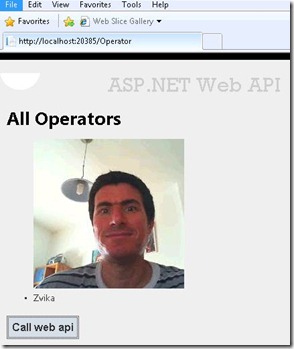

Capture25


Resources


http://www.dotnetcurry.com/ShowArticle.aspx?ID=856

SQL SERVER Buffer pool size

The following T-SQL query fetch the size of the buffer pool being used by as specific database.

  1:  select database_id, db_buffer_pages = COUNT_BIG(*) ,  db_buffer_MB =  COUNT_BIG(*) / 128
  2:        FROM sys.dm_os_buffer_descriptors
  3:        WHERE DB_NAME([database_id]) = 'AdventureWorks2008'
  4:        GROUP BY database_id

View the Buffer pool size of each object in the DB that was loaded to the memory pool

  1: USE AdventureWorks2008;
  2: GO
  3: 
  4: ;WITH src AS
  5: (
  6:    SELECT
  7:        [Object] = o.name,
  8:        [Type] = o.type_desc,
  9:        [Index] = COALESCE(i.name, ''),
 10:        [Index_Type] = i.type_desc,
 11:        p.[object_id],
 12:        p.index_id,
 13:        au.allocation_unit_id
 14:    FROM
 15:        sys.partitions AS p
 16:    INNER JOIN
 17:        sys.allocation_units AS au
 18:        ON p.hobt_id = au.container_id
 19:    INNER JOIN
 20:        sys.objects AS o
 21:        ON p.[object_id] = o.[object_id]
 22:    INNER JOIN
 23:        sys.indexes AS i
 24:        ON o.[object_id] = i.[object_id]
 25:        AND p.index_id = i.index_id
 26:    WHERE
 27:        au.[type] IN (1,2,3)
 28:        AND o.is_ms_shipped = 0
 29: )
 30: SELECT
 31:    src.[Object],
 32:    src.[Type],
 33:    src.[Index],
 34:    src.Index_Type,
 35:    buffer_pages = COUNT_BIG(b.page_id),
 36:    buffer_mb = COUNT_BIG(b.page_id) / 128
 37: FROM
 38:    src
 39: INNER JOIN
 40:    sys.dm_os_buffer_descriptors AS b
 41:    ON src.allocation_unit_id = b.allocation_unit_id
 42: WHERE
 43:    b.database_id = DB_ID()
 44: GROUP BY
 45:    src.[Object],
 46:    src.[Type],
 47:    src.[Index],
 48:    src.Index_Type
 49: ORDER BY
 50:    buffer_pages DESC;
 51: 

If I query the DB for the all tables
Capture6


Deleting of    the buffer poll can be done using the following DBCC:
DBCC DROPCLEANBUFFERS


Resources:
http://www.mssqltips.com/sqlservertip/2393/determine-sql-server-memory-use-by-database-and-object/


http://blog.extreme-advice.com/2012/11/24/find-buffer-pool-usage-of-database-in-sql-server/